The HSA receipt tracker built for long-term investors
Financial Mutants love their HSAs. Snappy handles the receipts.
Snap a photo of any medical receipt. SnapHSA reads the details, checks HSA eligibility and keeps an audit-ready record for decades, on iPhone, Android and the web.
Or go straight to: App Store · Google Play · Use on the web
- Free to start, no credit card
- No subscription
- Works with any HSA
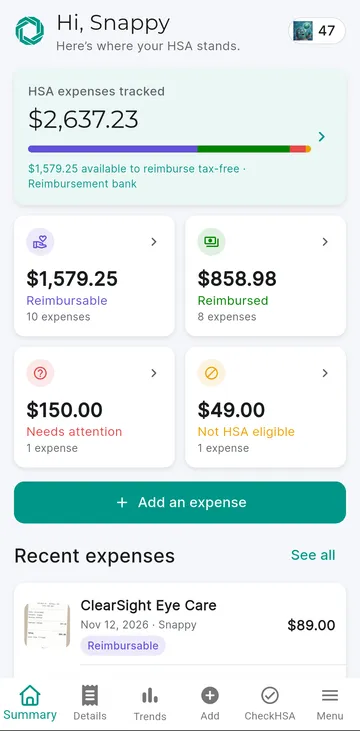

 $1,579 ready to reimburse
Bulk import, your own backups and family sharing
SnapHSA 2.1 gets a shoebox of receipts in faster, and keeps your records safe, portable and private.
Receipt inbox and bulk import
Forward receipt emails to receipts@snaphsa.app, or import up to 25 photos and PDFs at once. SmartSnap reads each one, and they wait in your inbox for a quick review.
Every document in one place
Keep the receipt, your insurer's EOB, proof of payment and extra pages on the same expense, so an audit takes one tap, not a search.
Reimbursement PDFs and tax-year reports
Match each HSA withdrawal to the receipts it paid back, then download a PDF with every receipt and document, plus a yearly report for your tax records.
Back up to your own Google Drive
Copy every receipt, document and letter, plus a spreadsheet of all your expenses, to a SnapHSA folder in your Drive. SnapHSA can only see the files it puts there.
Households
Share with your spouse or family: up to 4 people see and manage the same expenses, receipts and reimbursements, each with their own sign-in.
App lock and no ad tracking
Lock SnapHSA with Face ID or your fingerprint. SnapHSA doesn't use your advertising ID or track you across other companies' apps.
Take the SnapHSA tour in under a minute
The Reimbursement Bank, Trends, CheckHSA and SmartSnap, with your receipts kept private to your account.
From shoebox to audit-ready in three steps
The IRS doesn't need your receipts today. It needs them if you're ever audited, which can be years after you reimburse yourself. SnapHSA keeps them safe until then.
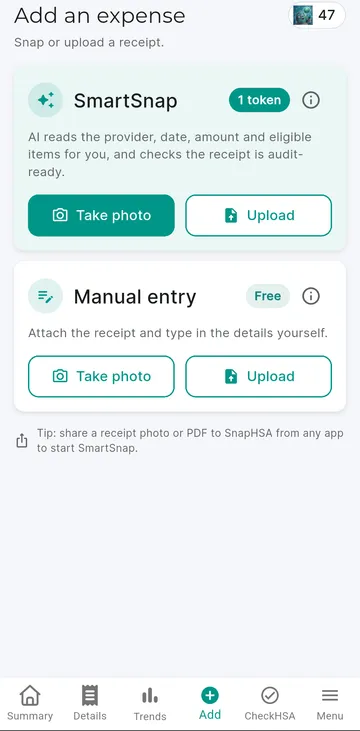
Snap or upload
Take a photo, upload a PDF, forward a receipt email, or import up to 25 receipts at once.
Review in seconds
SmartSnap fills in the provider, date, amount and items. You check it and save.
Reimburse anytime
Let your HSA grow. When you're ready, see exactly what you can pay yourself back tax-free.
Who it's for: people who save HSA receipts to reimburse themselves later. If you pay every medical bill with your HSA card and never need receipts past tax season, your HSA provider's app is probably enough.
Stop typing. Start snapping.
SmartSnap reads your receipt and fills in the details for you, then checks that it has what an audit needs. You stay the final auditor: review, edit and save. The original image stays attached to the record.
- Photos, PDFs, screenshots and forwarded emails
- Import up to 25 receipts at once
- Flags items that may not be HSA eligible
- Catches receipts that are missing key details
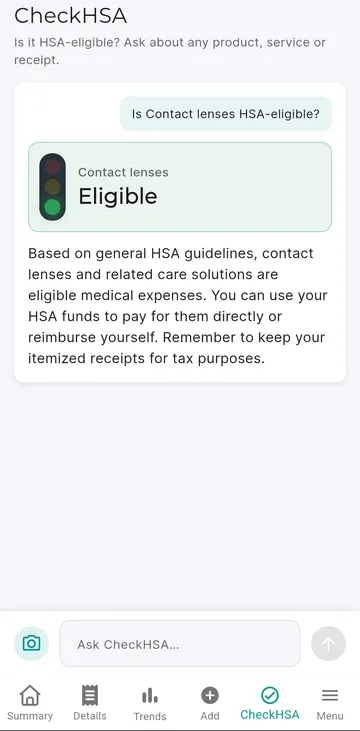
Is it HSA eligible? Ask Snappy.
Type a product or service, or snap a photo, and get a stop-light answer: green for eligible, yellow for maybe (for example, needs a letter of medical necessity), red for not eligible.
- Free to use, up to 40 questions a day
- Explains why, in plain language
- English and Spanish
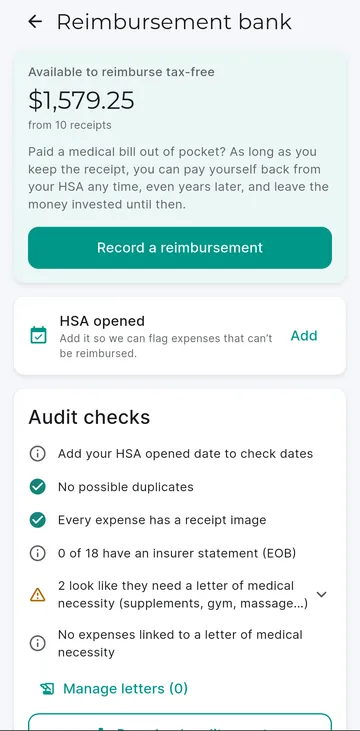
See what your HSA owes you
SnapHSA adds up every eligible expense you haven't reimbursed yet, so you always know how much you can pay yourself back tax-free. Record reimbursements, even partial ones.
- Match each reimbursement to its receipts, with a PDF
- Audit checks for duplicates and missing receipts
- Flags expenses dated before your HSA opened
- Tax-year PDF report with every receipt
Watch your tax-free balance grow
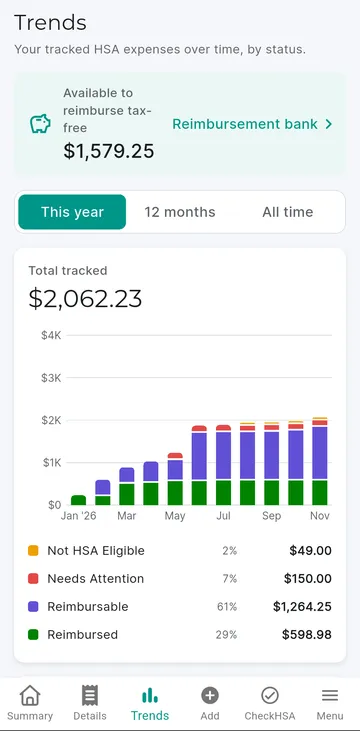
See your HSA expenses over time by status, and how much the money could grow if you leave it invested and reimburse yourself later.
- Reimbursed, reimbursable and needs attention
- Growth scenarios from savings to S&P 500
- Share with up to 4 people in your household

- $60,000 your saved receipts, reimbursable tax-free any time
- $62,986 tax-free growth that stays in your HSA
Example: $3,000 a year of medical bills paid out of pocket, with the same amount left invested for 20 years at a hypothetical 7% a year. Not a projection. Run your own numbers →
Pay today. Reimburse yourself years from now.
There's no deadline to reimburse yourself from an HSA, as long as the expense happened after your HSA was opened. Many investors pay medical bills out of pocket, leave their HSA invested to grow tax-free, and pay themselves back years or decades later.
The catch: you need the itemized receipt for every one of those expenses, for as long as it takes. Faded thermal paper and a shoebox won't cut it. SnapHSA will.
How does SnapHSA compare?
Built for one job: keeping your HSA receipts organized and ready, for as long as you need them.
| SnapHSA | HSA bank apps | Paper shoebox | Spreadsheet | |
|---|---|---|---|---|
| Effort | Snap and review | Manual entry | Manual sorting | Manual typing |
| If you switch banks | Your records come with you | Often left behind | Stays in a drawer | Yours to manage |
| Audit-ready | Image attached to every record | Limited or none | Receipts fade | No receipt images |
| Email receipts | Forward to receipts@snaphsa.app | Usually upload only | Print them out | Copy them by hand |
| Eligibility help | CheckHSA and SmartSnap flags | Varies | None | None |
| Backups | Your own Google Drive | Varies | One fragile copy | Yours to manage |
| Cost | Free basics, pay as you go | Included | Free | Free |
Compare in detail: SnapHSA vs Tripl · SnapHSA vs Shoebox · SnapHSA vs a spreadsheet
No subscription. Ever.
Tokens from 6¢ each, and they never expire. Tracking expenses, CheckHSA and household sharing are free; SmartSnap, exports, PDF reports and Drive backups use tokens. Earn free tokens by watching a short ad or inviting a friend.
Your data stays yours. Period.
Your health is your business. We never sell, rent or share your personal, health or financial information with advertisers or data brokers.
- Encrypted in transit and at rest
- Receipts only your account can open
- App lock and optional two-step verification
- No ad tracking, and your data is never sold
- Delete your account and data anytime


“I was trying to execute my long-term HSA strategy, but my bank's app is terrible and I hate manually tracking receipts. So I built the tool I wanted.”Adam Hansen · Founder, SnapHSA
Questions, answered
Do I have to submit receipts for HSA withdrawals to my bank?
No. You don't submit medical receipts to your HSA custodian or bank when you make a withdrawal or use your HSA debit card. The bank simply processes the transaction. However, the IRS requires you to keep itemized receipts on hand to prove that every dollar withdrawn from your HSA was used for qualified medical expenses if your tax return is audited.
Can I reimburse myself for an old medical expense?
Yes. This is known as the HSA shoebox strategy. There's no time limit on reimbursing yourself from an HSA, as long as the qualified medical expense happened after your HSA was first opened. Store your receipts in SnapHSA today, leave your money invested to grow tax-free, and reimburse yourself years or decades later.
Does SnapHSA work with my HSA provider?
Yes. SnapHSA is independent and never connects to your HSA or bank account, so it works the same no matter who holds your HSA.
How do I lock the app?
On iPhone or Android, turn on app lock in Menu > Security. SnapHSA then asks for Face ID, your fingerprint or your device passcode when you open it. You can also add two-step verification with an authenticator app there.
How do I save a receipt image to my phone?
Open an expense and press and hold the receipt image to save the full-resolution file. SnapHSA can also save a clean, cropped copy to your photo gallery, named by provider and date (for example, CVS_Pharmacy_05-22-2026.jpg).
Answers reviewed by Adam Hansen, founder · Last updated November 25, 2026
Start your HSA receipt vault today
Free to download. Track expenses by hand for free, and use tokens only when you want SmartSnap to do the typing.